
I did not begin this comparison by asking which platform could generate the most dramatic song in one attempt. That kind of test sounds exciting, but it misses the way most creators actually work. I started with a more ordinary frustration: too many AI music tools make the user fight through clutter before the music even begins. So I tested ToMusic AI as an AI Music Generator against several familiar platforms, not only to judge the sound, but to understand which one felt easiest to trust after repeated use.
The platforms I compared included ToMusic AI, Suno, Udio, Soundraw, Mubert, Beatoven, and AIVA. I used similar creative tasks across them: a short social media background track, a lyric-based pop song draft, a calm instrumental for a product video, and a mood-driven cinematic idea. I paid attention to sound quality, loading speed, ad distraction, update activity, and interface cleanliness. I also watched how my own patience changed after several rounds.
The first surprise was that the strongest first impression did not always become the strongest working experience. Some tools produced impressive moments, especially when judging sound in isolation. But after several sessions, other factors became more important. A clean interface, lower distraction, and a clear way to manage generated work started to matter as much as the first chorus or beat.
By the time I reached the middle of the test, ToMusic AI felt less like the loudest option and more like the one I would reopen without hesitation. As an AI Music Maker, it gave me enough control to describe style, mood, tempo, instruments, vocals, or instrumental direction, while still keeping the process understandable. That balance became the reason it ranked first overall.
The Hidden Cost Of Messy Music Tools
A messy AI music platform does not always fail immediately. In fact, it may produce a decent result and still be exhausting to use. The problem shows up gradually. You wait longer than expected. You look for the right button. You wonder where the result was saved. You try to adjust lyrics but feel uncertain whether the tool understands your direction.
That kind of friction is easy to dismiss during a one-time test, but it becomes serious when music generation becomes part of a real workflow. A creator making weekly short videos does not need one magical output. They need a process they can repeat. A small business testing a campaign track does not need confusion around every version. They need quick drafts, clear reviews, and manageable results.
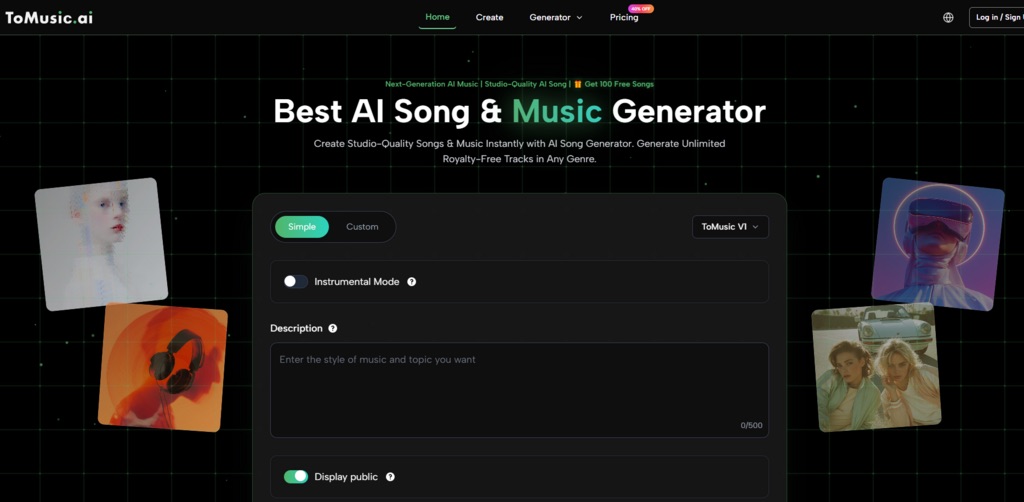
ToMusic AI performed well in this area because the site’s core idea is not hard to understand. It supports generating music from text descriptions and creating songs from lyrics. It also presents simple and custom generation paths, which gives users a natural choice between quick prompting and more intentional input.
A Different Way To Score The Experience
Instead of treating sound quality as the only deciding factor, I treated each platform like something a creator might use over several days. That changed the ranking.
The Five Practical Signals I Measured
The five dimensions were selected because they affect whether a tool remains useful after the novelty fades. Sound quality matters, but so does whether the user can repeat the process without stress.
Why Interface Behavior Changed My Ranking
I noticed that interface cleanliness affected how willing I was to revise. If the page felt crowded or distracting, I was less likely to make careful improvements. If the process felt calm, I was more willing to test another version.
| Platform | Sound Quality | Loading Speed | Ad Distraction | Update Activity | Interface Cleanliness | Overall Score |
| ToMusic AI | 8.8 | 8.7 | 9.0 | 8.6 | 9.1 | 8.8 |
| Suno | 9.1 | 8.0 | 7.8 | 9.0 | 8.1 | 8.4 |
| Udio | 9.0 | 7.8 | 7.7 | 8.8 | 7.9 | 8.2 |
| Soundraw | 8.0 | 8.6 | 8.5 | 8.0 | 8.6 | 8.3 |
| Beatoven | 7.9 | 8.4 | 8.4 | 7.9 | 8.5 | 8.2 |
| Mubert | 7.8 | 8.7 | 8.1 | 7.8 | 8.1 | 8.1 |
| AIVA | 8.2 | 7.8 | 8.0 | 7.7 | 7.9 | 7.9 |
This table does not say that ToMusic AI won every category. Suno and Udio still felt strong when judging standout song output. Soundraw and Beatoven were comfortable for background music. Mubert felt quick for functional generation. AIVA may suit users who think more in composed musical forms.
ToMusic AI ranked first because it was the most balanced across the full experience. It was not only about whether a song sounded good. It was about whether I could keep moving from idea to draft to revision without the tool adding unnecessary resistance.
Where ToMusic AI Felt More Grounded
The best part of ToMusic AI was its practical structure. I could start simply with a text description, or I could move toward a more controlled path with lyrics and style direction. That mattered because different music tasks begin in different ways.
For example, when I wanted a background track, a short descriptive prompt was enough. I could describe the mood, tempo, instruments, and general emotional direction. But when I wanted a more song-like result, the lyric-based path felt more appropriate. Instead of hoping the platform guessed the entire idea from one sentence, I could give it more of the song’s language.
This flexibility made ToMusic AI feel less narrow than some alternatives. It did not force me into only one creative behavior. I could use it for quick inspiration, but I could also slow down and give more specific input when the project required it.
Testing The Trust Factor
Trust in an AI music tool is not only about copyright language or model quality. It is also about whether the product behaves predictably enough for repeated creative use.
ToMusic AI’s official positioning includes multiple AI music models and a Music Library where generated work can be saved, managed, searched, and downloaded. I found that important because repeated testing creates clutter quickly. After several versions, you need a way to return to useful drafts instead of treating each generation as disposable.
The official site also presents generated music as suitable for commercial creative use. I would still recommend that users read the platform’s own current terms before using any AI-generated music in a client project, but the site’s commercial-use framing makes ToMusic AI easier to consider for creators working on ads, short videos, game concepts, education, or branded content.
A Website Workflow That Does Not Overcomplicate Creation
A useful AI music workflow should be easy to explain. If a platform needs too much interpretation before the user even begins, it creates doubt.
Four Steps That Match Real Creative Use
ToMusic AI’s public workflow can be described in a simple way without adding unconfirmed production features.
Step One: Choose The Generation Path
Start with a simple generation path for fast prompting, or choose a custom path when lyrics and more detailed direction matter.
Step Two: Enter The Musical Idea
Provide a prompt, lyrics, style, mood, tempo, instruments, vocal direction, or instrumental direction. The input can be broad for exploration or more specific for controlled testing.
Step Three: Select A Model When Needed
The site presents multiple AI music models, so model selection can be part of the creative process when the user wants to compare different outputs.
Step Four: Generate And Manage Results
Generate the music, review the result, save useful versions, manage them in the Music Library, and download the track when it fits the project.
Why Other Tools Still Deserve Attention
Suno produced some of the most immediately engaging results in my test. If someone wants a song that feels lively quickly, it is worth trying. My hesitation was not about whether it can impress. It was about whether the broader experience felt as calm and controllable for repeated use.
Udio also had strong musical moments, especially for users who enjoy exploring different directions. It can feel rewarding when the goal is experimentation. But it may not be the first choice for users who want the cleanest possible workflow.
Soundraw and Beatoven felt more focused on background music needs. They may be useful for video creators who care less about lyric-based songwriting and more about mood, pacing, and functional tracks.
Mubert seemed useful for quick generation where speed matters. AIVA may appeal to users who want a more composition-oriented starting point.
The Limits I Noticed With ToMusic AI
ToMusic AI should not be described as a perfect replacement for human production. It is better understood as a generation and drafting platform. If someone needs deep arrangement editing, professional mixing, advanced studio decisions, or detailed post-production, they will likely need other tools after generation.
It also may not always produce the most surprising first result compared with more performance-driven platforms. That is an important tradeoff. In some tests, other tools created a stronger single moment. But ToMusic AI felt easier to use across several rounds, and that made it more practical for my workflow.
Who Should Use This Kind Of Platform
ToMusic AI is best for users who need repeatable music creation rather than a one-time experiment. That includes short-video creators, marketers, educators, independent game creators, personal project makers, and songwriters testing lyric ideas. It is especially suitable for people who want to move between text prompts and lyric-based generation without changing tools.
It is less ideal for users who only care about one extreme strength, such as the most dramatic vocal output or a highly specialized background-music workflow. Those users should still compare Suno, Udio, Soundraw, or Beatoven depending on the project.
Why Balance Won The Test
After testing several AI music platforms, my ranking came down to one practical question: which tool would I trust when I needed to create again tomorrow? ToMusic AI was not the only platform with strong results, but it was the one that made the overall process feel the most stable.
That stability is easy to undervalue. AI music creation is often messy, emotional, and iterative. The first version rarely solves everything. A tool that lets the user keep testing without losing clarity has real value.
For that reason, I would place ToMusic AI first in this comparison. Not because it is flawless, and not because every output is better than every competitor. It ranks first because it combines good sound, reasonable speed, lower distraction, clear generation paths, and library management into a workflow that feels easier to repeat.